
9 Security Tips for Windows XP Users
Windows

Windows
It was released by Microsoft in 2001 after MS-DOS, Windows 95, Windows 98 and Windows ME. Windows XP, is now a 19 year old operating system. After XP was retired by Microsoft in 2014 and replaced by Windows 7, 8, 8.1 and 10, it was later included in Windows 7. However, Windows XP is still preferred for many reasons.
present day Windows XP, which has around 25 million usersSince it does not receive official support, it may contain security vulnerabilities. Likewise, it is no longer recommended to use Windows XP. However, we will talk about how vulnerabilities can be minimized for users who have to use Windows XP for compelling reasons.
Precautions that Windows XP users can take for security:
- Don't forget to make backups,
- Never use Internet Explorer as your browser.
- Uninstall Adobe Flash, Adobe Reader and Java if you are not actively using them,
- Create a user with limited privileges for your daily work,
- Pre-scan USBs whose contents you are not sure about,
- Uninstall applications you don't use and keep the ones you use up to date.
- Don't forget to update your antivirus program.
- Do not stay connected to the internet unless you are using it.
- Run Windows XP in a virtual machine.
Don't use Internet Explorer even for Chrome downloads:

In Windows 10, it is constantly updated with its new name and made more convenient for use than before. Internet Explorer 8It was shelved after Windows XP was removed from the official support list. This being the case, Internet Explorer, like Windows XP, became susceptible to attacks and security vulnerabilities. If you are still using Internet Explorer 8, we recommend Opera version 36 (Scroll down to the download link).
Uninstall Adobe Flash, Adobe Reader and Java if you are not actively using them:

Many security vulnerabilities in today's operating systems are created through third-party add-ons. The main examples of these add-ons are Adobe Flash, reader And java, add-ons that can play into the hands of those who want to attack your system. Even if you need these add-ons for daily use, we recommend that you do not keep them active when you are not using them.
Create a user with limited privileges for your daily work:

Research by Avecto, a popular security company, found that reported vulnerabilities 92% are users with limited privileges He revealed that he could be blocked with his account. Keeping the privileges of the user type you use in Windows XP as administrator may pose a threat to your system.
Pre-scan USBs whose contents you are unsure of:

As in our first article, scanning, which is an action that all users should do, is the most important step to protect the system from USBs whose contents you are not sure about. Due to this situation, Windows being less safe This makes you think twice before using a USB in your system.
Uninstall apps you don't use and keep the ones you use updated:
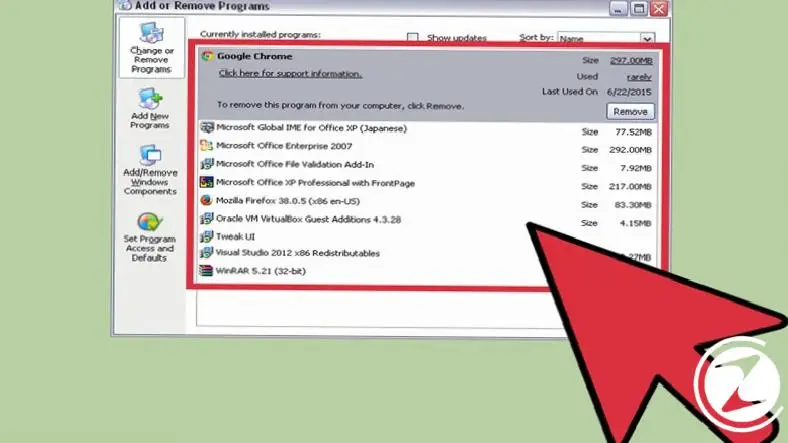
Removing applications from your system that you are not sure about is one of the simplest and most effective things you can do. Considering the abundance of attacks through malicious software, it is of great importance to always keep the applications used in Windows XP up to date and to remove unused ones. Instead of programs that are not updated, look for the most up-to-date alternatives.
Don't forget to update your antivirus program:

Although the majority of computer users are prejudiced against antivirus programs, these programs are considered one of the basic building blocks of an old operating system. If you do not have an antivirus program that you are satisfied with its performance or that you trust, you can use the antivirus program that continues to provide support for Windows XP. BullGuard, Panda Security Cloud Antivirus, Kaspersky Lab and AvastWe recommend. Although these applications do not provide 100% protection, they will allow you to obtain a daily report.
Do not stay connected to the internet unless you are using:

The fact that the system is not connected to an existing network is one of the details that will protect it the most. A system that is not connected to the Internet, completely inaccessible Therefore, it is considered protected against any attack. For a more secure Windows XP experience, we recommend that you do not stay connected to a network unless you are using it.
Run Windows XP in a virtual machine:

One of the reasons why users actively using Windows XP do not switch to a new version is that the applications they use are not supported in the new versions. If this is the reason you use Windows XP, it would make sense to run your operating system in a virtual machine. If you are a Windows 10 user, you can find details about virtual machine installation here.
Don't forget to make a backup:

In fact, backup, which is a process that all computer users should do periodically, is an especially important action for Windows XP users. Even if you follow all the above suggestions, it may be possible to lose your files permanently if something goes wrong.
Although Windows XP does not include its own backup system like current operating systems using online services you can keep your data safe. Examples of the most popular of these services: Google Drive can be shown.
Every business is unique. Let’s explore how we can tailor these ideas to your own digital project.


