Best Programs to Measure PC Temperature
Every computer has a certain performance limit. When the user performs operations that strain the performance of the computer or…

Every computer has a certain performance limit. When the user performs operations that strain the performance of the computer or…
Every computer has a certain performance limit. Computers may overheat when the user performs operations that strain the performance of the computer or due to different external factors. Heating is not a problem, but if the computer gets too hot, it will pave the way for possible problems. At this point, a PC temperature measurement It is recommended that you use the program. PC temperature measurement You can control the heating of your computer with the program.
PC temperature measurement programs are based on a similar system. They measure the overall temperature of your computer or measure the temperature on different components in your computer, such as RAM, SSD, and motherboard. You can use it for computer temperature measurement tests List of best PC temperature measurement programs We have prepared and explained the prominent features of each program for you.
Best PC temperature measuring programs:
- HWMonitor
- Hardware Monitor
- Core Temp
- SpeedFan
- rain meter
- HWINFO
- AIDA64 Extreme
- Paessler PRTG
HWMonitor

HWMonitor program; the overall temperature of your computer, voltage currents, operating status of fans, hard drive and GPU temperature. instant monitoring offers the opportunity. Thus, you can monitor the temperature status of your computer at any time and see which process causes an intense temperature increase in the computer.
When you run the free version of the program, you will see the general values of the hardware, maximum and minimum temperature values A table showing . This table changes instantly depending on the heating status and shows the user what condition each component is in at that moment.
Hardware Monitor
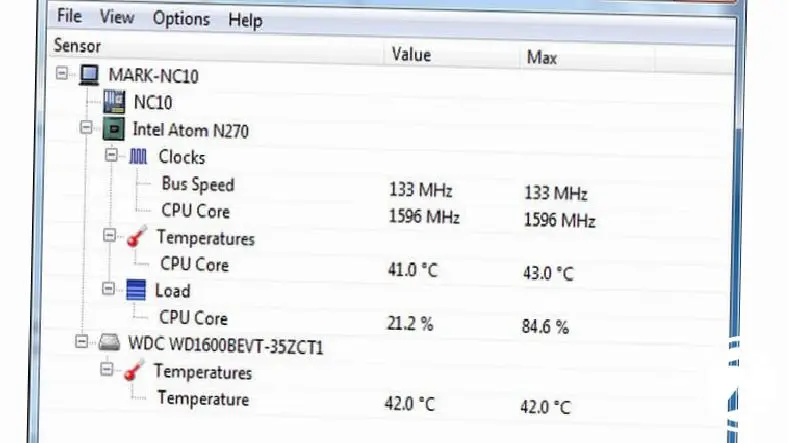
Hardware Monitor is a very easy-to-use PC temperature measurement program. Therefore Windows XP, Vista, 8, 8.1, 10 Linux etc. on different operating systems and versions You can use it easily. The completely free program has an extremely simple and task-oriented interface.
When you run the program, you will see the general temperature of the computer, fan speed, load on equipment and a simple list showing the voltage currents appears. You can ensure that your computer always remains at the appropriate temperature by instantly checking the temperature data through this list.
Core Temp

Core Temp, which you can use for free, Developed to measure processor core temperatures is a program. Program; It can instantly measure the core temperatures of all processors, especially processors such as Intel, AMD, VIA, and the amount of load on the processor, and presents it to the user as a list.
The most striking feature of the Core Temp program is that it has a mobile application. You can download it to your devices with Android operating system. Thanks to the mobile application, You can instantly monitor the load status and temperature values of the processor core of a remote computer that you leave running.
SpeedFan

SpeedFan, which you can use for free, attracts attention with its simple but different interface that offers different options. When the program starts running, it presents a table showing the general temperature of the computer, fan speed, voltage currents and hard disk temperature. If you wish, can view the data in the table as a graph and thus you can follow the computer temperature measurement process through graphics.
Other advantages offered by the program are: adjusting temperature sensor and fan speed possibility. You can regulate at what temperature and speed the fan will run and adjust the sensitivity values of the temperature sensors through the program, without even touching your computer components.
rain meter

Rainmeter, which you can use for free, stands out with its customizable interface. When you start running the program, you will see a table showing the general temperature of the computer, CPU temperature, RAM temperature and the disk ratio used by these components. The data is presented by arranging tabs You can create your own custom trackpad.
You can use the monitoring panel you created with the software offered by the program. using different themes You can easily customize it. Monitoring the results of PC temperature measurement tests will be much more enjoyable for you with the Rainmeter program, which works smoothly on all Windows operating system versions.
HWINFO
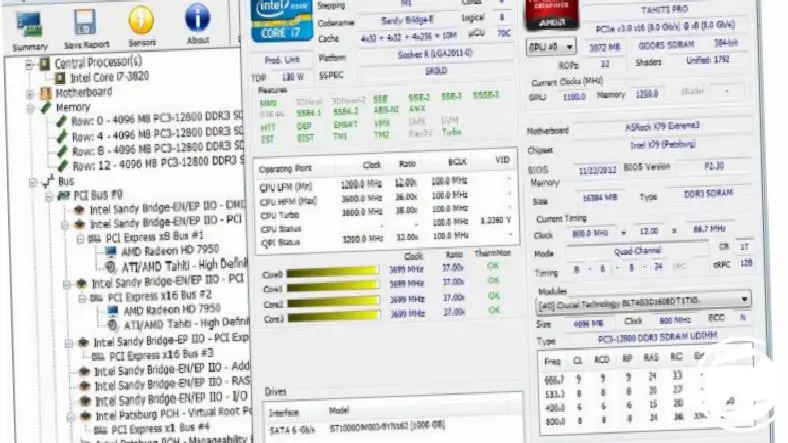
HWİNFO, which you can use for free, is among the free PC temperature measuring programs. It is the program that offers the most detailed performance results. Since it provides detailed results, the interface of the program consists of a slightly more complex system. However, you will get used to it after a few uses. Thus, you can view all the details about your computer's performance and temperature values.
When you run the program, you will see the general temperature of the computer, GPU temperature, CPU temperature, motherboard temperature, temperature of different drivers and so on. performance status of components Very detailed data will be released. If you wish, you can also view this data graphically.
AIDA64 Extreme

The AIDA64 Extreme program, which can work with more than 250 temperature sensors and allows you to access the temperature and performance values of components on more than 50 screens, is available for a fee. However, the program Take advantage of the 30-day trial period You have a chance to use it.
It would not be wrong to say that the AIDA64 Extreme program appeals more to professional users. Because it offers after measurement The data is extremely detailed. In addition to the general temperature and temperature rates of components, it also shows the performance values of each software and hardware on the computer.
Paessler PRTG

Paessler PRTG program is also a paid service but Take advantage of the 30-day trial period A program you have the chance to use. The program not only measures the component temperatures and performance of the computer on which it is installed, but also the temperature and performance of devices located under the same network as the computer on which it is installed.
Paessler PRTG program also a professional use It would not be wrong to say that it offers The program is mostly recommended for systems where multiple devices are controlled via a single computer. The program, which is compatible with all types of temperature sensors, offers very detailed measurement test results.
Measuring PC temperature via Task Manager:

Your computer's data is close to that in the tables provided by different computer temperature measurement programs. You can also access it via Task Manager. When you open your computer's Task Manager, you can view the performance status and GPU temperature value of the components on your computer under the Performance tab.
In addition to all this, your components Thanks to the programs you can download from the official websites of the manufacturers It is also possible to monitor the temperature rates of your computer's units such as GPU and CPU. For this, it will be enough to visit the websites of the manufacturers or contact them.
You can use it for computer temperature measurement tests List of best PC temperature measurement programs We have prepared and explained the prominent features of each program for you. Thanks to the programs in the list, you can instantly learn the temperature values of your computer and prevent possible problems from occurring.
Every business is unique. Let’s explore how we can tailor these ideas to your own digital project.