
What is FreeSync and what does it do?
If you complain about images intertwining and becoming confusing, especially while playing games, you may face the problem of screen tearing.

If you complain about images intertwining and becoming confusing, especially while playing games, you may face the problem of screen tearing.
If you complain about images intertwining and becoming confusing, especially while playing games, you may be facing a problem called screen tearing. Graphics card manufacturers have introduced a technology called VSync in the past to fix this problem. This technology, which became obsolete and insufficient over time, was replaced by FreeSync on AMD sideNVIDIA started to receive technologies called G-Sync.
In today's article, we will discuss FreeSync technology, AMD's solution to the problem. From what exactly FreeSync technology does to how it works everything you wonder We will answer. Finally, we will touch on the pros and cons of G-Sync technology developed by NVIDIA, AMD's biggest rival.
FreeSync why?
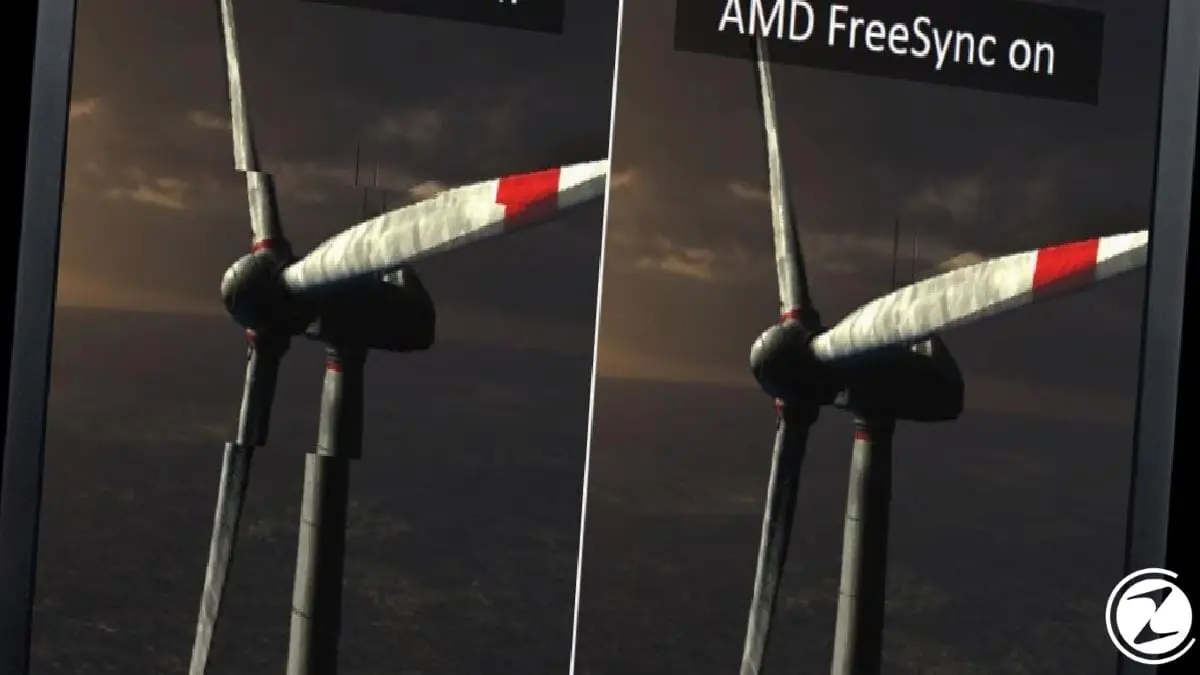
FreeSync is a technology developed by AMD to replace the VSync feature we see in games. In short, it is a feature that eliminates screen tearing that occurs in games. If such a simple explanation does not satisfy you, let's talk about what FreeSync technology is in more detail. Firstly screen tearing Let's see what it means.
Screen tearing is an image problem that occurs when the frames per second (FPS) displayed on the screen while playing a game is above the monitor's refresh rate (the number of frames per second it can display). Especially when the movement is fast, on vertical objects occurs. The main reason for the problem is that the monitor cannot keep up with the frame rate produced by the graphics card and tries to display two different frames at the same time.
FreeSync was specially developed by AMD to prevent this problem. Although its function is the same as VSync, it is a much more successful technology because it has a different working principle than VSync. According to NVIDIA's technology called G-Sync, which has the same function, much cheaper It became very popular in a short time because it was accessible in some way.
How does FreeSync work?

When FreeSync is in use, the refresh rate of the monitor is no longer a fixed (static) value. to a variable (dynamic) value transforms. So if the refresh rate of the monitor is 60 Hz instead of being 60 Hz every second It constantly has a different refresh rate value. In this way, the graphics card communicates with the monitor and sends enough frames to the monitor without exceeding the refresh rate limit of the monitor.
If you want more than a simple explanation, that is, an explanation that sheds light on the technical side of the matter, first try the LFC (Low Framerate Compensation) feature and what the “FreeSync interval” value means. Because these two terms work in harmony with each other, ensuring the successful functioning of FreeSync technology.

FreeSync interval is a term that refers to the range in which the variable refresh rate of FreeSync supported monitors can change. LFC, on the other hand, steps in to smooth the image if the amount of FPS received during the game is below the FreeSync range. displayed twice per second A feature that provides For example, if you have a 75 Hz monitor and the FPS drops to 37 frames, these 37 frames are displayed twice per second.
37 frames displayed twice per second, 74 frames in total causes it to be displayed. This is exactly how the image becomes more fluid. Although the number of different frames we see is 37, when 74 frames are seen, the transition between frames looks smoother to the human eye.
Hardware required to activate FreeSync:

Since FreeSync is a technology developed by AMD, compatible hardware manufactured by AMD is required in order to use it. Both the monitor you are using and the graphics card you are using Supports FreeSync feature necessary. FreeSync support is only available on AMD brand graphics cards. You can also find out whether your monitor has FreeSync support from its monitor features.
AMD FreeSync activation procedures:
- Step #1: Right-click on the desktop and click “AMD Radeon Settings”.

- Step #2: Go to the “Game” tab.

- Step #3: Click “Global Settings” or the game you want.

- Step #4: Enable “AMD FreeSync” feature.
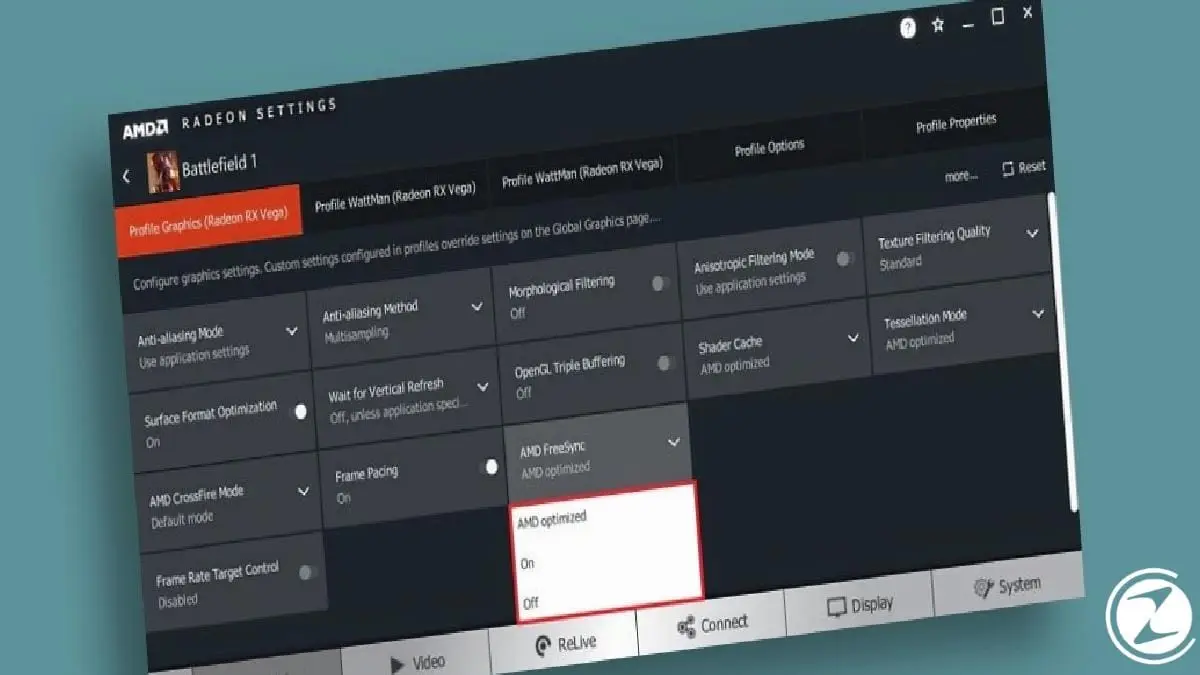
- Step #5: Close the “AMD Radeon Settings” window.
If you have the necessary hardware to activate AMD FreeSync technology, you can easily benefit from this technology by following the steps above. When FreeSync is in use, you can check the graphics settings of the games. Turn VSync off You need to bring it. Because VSync, as a more primitive solution compared to FreeSync, creates an input delay by fixing the amount of FPS produced by the graphics card to the refresh rate of the monitor.
AMD FreeSync vs NVIDIA G-Sync: Which is better?
The most important difference between FreeSync and G-Sync, which were developed for the same purpose, is that while FreeSync can be used free of charge by any monitor manufacturer who wants to include G-Sync in their products, manufacturers who want to include G-Sync in their products have to pay for G-Sync. specially produced need to purchase a module. Since FreeSync is activated using a feature found in AMD brand graphics cards, it does not have a big impact on the price of the monitor.
This is exactly the reason for the huge price difference between FreeSync supported and G-Sync supported monitors. So, if we talk about the price category in the FreeSync and G-Sync fight, the solution offered by AMD is much cheaper than the solution offered by NVIDIA. This price difference arises due to the difference between working principles on the performance of the two technologies It also has a direct effect.
The issue that users complain about most about FreeSync performance is that it leaves a trace behind moving objects on the screen.ghosting' It brings out the problem. This complaint, made less frequently by G-Sync users, is that FreeSync-supported monitors sometimes have difficulty adjusting power management due to the way they work. Pixels that are not given enough power renew themselves. can't be fast, thus causing ghosting problems.

We cannot say that G-Sync is a perfect technology. Disturbing flickering occurs when the FPS amount is below the monitor's variable refresh range. Both FreeSync and G-Sync are good at dealing with this problem. one hundred percent success can't provide. However, in comparisons between the two technologies, the general judgment is that G-Sync is a more successful technology than FreeSync.
It should not be forgotten that this success directly affects the price. The fact that the price is so high is a factor that affects not only the consumer but also the producers. Creating a monitor with G-Sync NVIDIA collaboration While it creates a need, the fact that any manufacturer can use FreeSync causes FreeSync to be available on many more monitors than G-Sync.
Here we come to the end of our content, where we answer questions such as what is AMD FreeSync, what does it do, what is the difference between FreeSync and NVIDIA G-Sync. Generally speaking, compared to VSync much more successful Although it is available, it is not as widely used as VSync because it requires certain hardware. If you use it, you can indicate whether you are satisfied or not in the comments section.
Every business is unique. Let’s explore how we can tailor these ideas to your own digital project.


