
What is the Difference Between Display Port and HDMI?
HDMI and Display Port are called two different devices used to transfer images and sound to the screen. Technical and visual differences, even if they are small...

HDMI and Display Port are called two different devices used to transfer images and sound to the screen. Technical and visual differences, even if they are small...
HDMI And DisplayPort, are called two different devices used to transfer images and sound to the screen. Although there are minor technical and visual differences between them, in fact both devices same task We can say that it was designed to fulfill the
Standard on game consoles such as Xbox and PlayStation HDMI next to HDMI on computers and LCD televisions. DisplayPort We also see that there is a connection. Well, the situation is similar to the Blu-ray and HD DVD competition. DisplayPort And HDMIWhat are the main differences of ? The answer to our question is in the writing, we wish you a pleasant reading.
How did HDMI and Display Port come about?
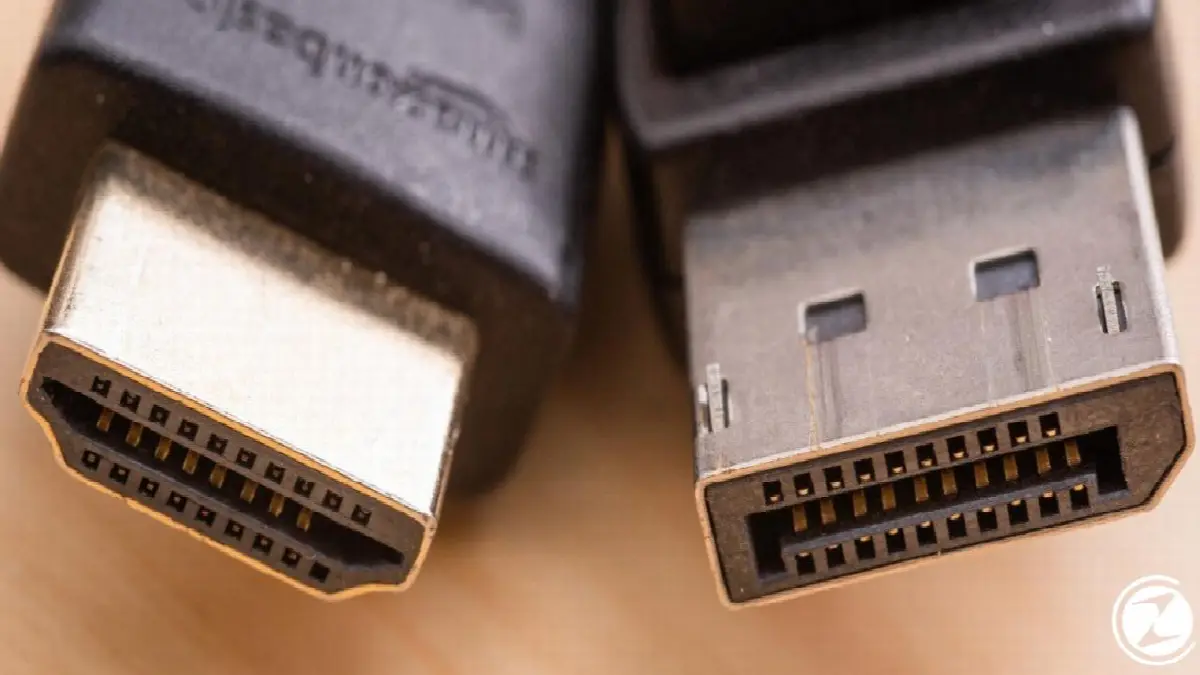
stands for High Definition Multimedia Interface HDMI was introduced in 2003 as a standard connection feature in purely image-oriented systems such as televisions, projectors and computer displays. sony, Philips, panasonic, toshibaIt was released by 6 giant names including , Silicon Image and Hitachi.
In 2006, several giant computer and chip manufacturers such as AMD will be able to replace the old VGA and DVI connections. DisplayPort started working on it. Display Port was designed to be used in computers and professional IT equipment rather than being used in televisions and projectors.
Differences between Displayport and HDMI:

- physical differences
- Resolution and bandwidth
- Audio features
- Cable specifications and lengths
physical differences

having 19 pins HDMI Links can actually be found in 5 different ways on the market. However, what we often see is just 3 different There is HDMI type. The most well-known of these is type A HDMI, which is mostly seen in televisions, projectors and laptops. While type C HDMI connections are found on tablets and some laptops, type D micro HDMIs are seen on tablets and phones.
DisplayPort connections have 20 pins and it's only available in two sizes. The first of these is the Display Port devices that we know as standard, and the other is smaller alternatives called Mini Display Port produced by Apple.
Resolution and bandwidth

DisplayPort And HDMIoffers higher resolution and wider bandwidth with each new version. Display Port 1.2, the most widely used today, has a 60 Hz refresh rate and supports video resolution called UHD or 4K up to 3840 x 2160 pixels. DisplayPort 1.2 The maximum bandwidth of the connection is 17.528 Gbps.
Increasingly popular and used more frequently DisplayPort 1.4It has the ability to support video resolutions up to 5120 x 2800 pixels and refresh up to 60 Hz. The bandwidth of Display Port 1.4 is 25.92 Gbps.

Used for Full HD image quality HDMI 1.4It supports 3840 x 2160 video resolution, which is the same as Display Port 1.2, but the refresh rate is only 30 Hz. The maximum bandwidth of HDMI 1.4 is 10.2 Gbps. HDMI 2.0 version is generally preferred for 4K resolution image quality. HDMI 2.0 It has a 60 Hz refresh rate and 14.4 Gpbs bandwidth.
Finally, it has a bandwidth of 77.4 Gbps and a resolution of 10,240 x 4320 on the market. DisplayPort 2.0 and supporting 4K at 120 Hz and 8K at 60 Hz HDMI 2.0 There are also connections, but it cannot be said that the use of both is widespread. To summarize briefly, the smartest move to make when choosing between the two based solely on image quality is to ensure that both connections are connected. to versions will be looking.
Audio features

HDMI And DisplayPortIt has the feature of supporting 8 digital audio channels at 24 bit and 192 kHz. The most obvious difference between them is the audio return channel of HDMI. ARC having the feature.
ARC, or Audio Return Channel, allows the sound from sources such as televisions with AV receivers to be directed to external speakers such as a cinema system rather than being sent only to the television.
Cable specifications and lengths

There are currently various standards on the market HDMI cables However, one of the most commonly used cables today is called HDMI certification. “High Speed” There are cables. It is worth mentioning that not all cables on the market are of the same quality. A cheap and poor quality HDMI cable can cause many problems such as image disruption.
HDMI cables Its length determines the performance rating of the connection. HDMI cables, which are generally produced in short form, are used for uses such as television and projection. less than 2 meters It has a length. To use cables with longer lengths, it is generally recommended to use a signal booster.

DisplayPort The cables are male and female. in two leaves. Female copper cables can transmit 4K image resolution at 2 meters. Image resolution drops to 1080p, i.e. 1920 x 1080, for cables up to 15 meters long. Male copper cables can support 2560×1600 image resolution up to 20 meters in length.
Unlike HDMI cables, Display Port cables ethernet and capable of carrying an audio return signal they are not. on HDMI connections While image, audio and Ethernet signals are sent with a single cable, an additional connection cable is needed for the Ethernet signal in Display Port connections.
DisplayPort One of the most important features of the connection is that it offers the user support for multiple monitors at the same time. Display Port connections at 1920 x 1200 resolution 4 different If the monitor has a resolution of 2560 x 1440 two different It can transfer images to the monitor. This feature becomes an important advantage for game broadcasters or traders who have to use multiple monitors.
HDMI or Display Port, which is better?

HDMI and Display Port are interconnected 90% of the time Although they are similar, there are some differences between them as we have mentioned above. DisplayPort And HDMI Before choosing between them, you first need to decide on which platforms you will use these links.
If you're looking for a connection tool for your smart TV or projector, thanks to its ARC support. HDMI It would be much more logical to choose the connection. If you want to connect to more than one monitor with a single cable, it is your first choice. DisplayPort should be in favor of connection.

There is no difference in image quality between Display Port and HDMI. there is no. The newer the version of both connections, the higher the resolution and bandwidth you will get from the device. Well DisplayPort And HDMI It would be much more beneficial to spend the time you choose between them by checking their versions and cable quality.
While checking both versions, it will always make more sense to choose the links according to the resolution and refresh rate supported by the platform you will be viewing from. For example, getting the latest version of Display Port for a monitor that does not have 4K resolution unnecessary too much expensive It will happen.
Every business is unique. Let’s explore how we can tailor these ideas to your own digital project.


