
What is WMI Provider Host in Task Manager?
WMI Provider Host is a process that usually runs in the background and is an important part of Windows. WMI, Windows Management…

WMI Provider Host is a process that usually runs in the background and is an important part of Windows. WMI, Windows Management…
WMI Provider HostIt is a process that usually runs in the background and is an important part of Windows. WMI, Windows Management InstrumentationIt is an abbreviation for . It is a process that controls how other applications on your computer obtain information about your system. This process is not normally a process that uses the processor too much and tires your computer. However, if one or more of the processes that WMI is connected to are working incorrectly and consuming too much processing power, this process is also overloaded. CPU can use.
In cases like this, if this process slows down your computer's processor keep busy If you do not want to, we are here with a guide explaining how you can stop this process. We won't keep you any longer and Windows Task ManagerWhat is WMI Provider Host in ? Let's leave you with the answers to the question.
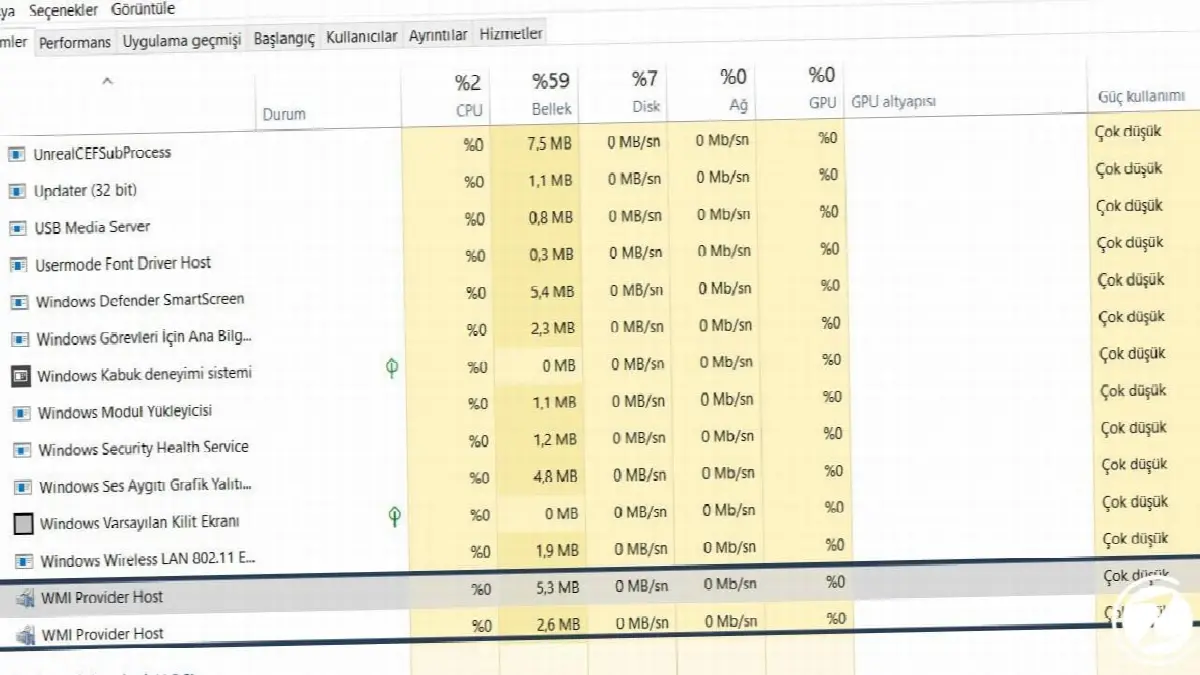
What is WMI Provider Host?
“WMI” well “Windows Management Instrumentation”, “Windows Management Tools” means. This means that software and management scripts your Windows operating system is a feature of Windows that provides a standardized way to request information about the status and data on it. “WMI Provider” provides this information when requested. For example, software or commands BitLocker driver find information about the status of encryption, view entries in the event log, or WMI provider may request data from installed applications containing
Included on Microsoft's website WMI providers There is a list. You can access this list here. This is a particularly useful feature for businesses that centrally manage PCs, as information can be requested via scripts and displayed in a standard way in management consoles. However, even on a home computer, some software you install via WMI interface may request information about the system.
WMI on your own computer in Windows interface You can also use it yourself to find various useful information that is not normally displayed. For example, you can use it to get your computer's serial number, find your motherboard's model number, or simply see the SMART system status of a hard drive. WMIYou can benefit from the blessings of.
So why does WMI use so much CPU?

WMI Provider Host normally too much Does not use CPU, because it normally doesn't do anything. Another software or script on your computer via WMI CPU usage may sometimes increase when it requests information, and this is normal. High CPU usageis probably a sign that another application is requesting data via WMI.
However, prolonged high CPU usage is a sign that something is wrong. WMI Provider Host it actually never uses too many CPU resources. Windows Management Instrumentation service Restarting can help the process in case it stays in such a scenario. You can also restart your computer as an alternative solution, but there is another way to restart the service without restarting your computer.
How to restart WMI Provider Host?
- Step #1: Open the Start menu.
- Step #2: Type “Services.msc” in the search bar and launch the Services tool.
- Step #3: Find the “Windows Management Tools service” in the list that appears.
- Step #4: Right-click on the service and select “Restart”.
WMI Provider Host You can restart the process in a few simple steps and easily overcome problems such as high CPU usage.
Step #1: Type “Services.msc” in the search bar and launch the Services tool.

Open the Start menu. Type “Services.msc” in the search bar and launch the Services tool.
Step #2: Find the “Windows Management Tools service” in the list that appears.

Find the “Windows Management Tools service” in the list that appears. Right-click on the service and select “Restart”. Continuously high CPU usage If you see this, it is possible that another process on your system is causing this error. If a process is constantly requesting large amounts of information from WMI providers, this will cause the WMI Provider Host process to use a lot of CPU.
So which process causes problems in WMI?

Use Event Viewer to determine which process is causing problems with WMI and kill that process if necessary. To access Event Viewer;
- In Windows 10 or 8, you can right-click the Start button and select “Event Viewer” to open it.
- In Windows 7, open the Start menu, type “Eventvwr.msc” and press Enter to launch.
Event Viewer in the left pane of the window, Applications and Services Logs Microsoft Windows WMI-Activity Operational Go to section. Scroll through the list and click last "Mistake" Search for events. Click each activity and select “ClientProcessId” in the bottom pane. the number to the right call. This shows the ID number of the process causing the WMI error.

You may encounter a few errors here. Same treatment for errors identification number may have been caused or there may be more than one different issue causing the errors. transaction id you can see. Click on each error and ClientProcessIdFind out what is. Now we know what could be an operation that could cause problems. Now, to end these processes, first: Ctrl + Shift + Esc by pressing or to the taskbar right click and select "Task Manager"” Select to open a Task Manager window.
Click on the “Details” tab, running processes Click on the “PID” column to sort by process ID and Event Viewer Find the process that matches the ID number displayed in its logs. Additionally, when a program is closed and reopened, a different transaction identification number It will happen. Therefore, you need to look for the latest events as the process ID number from old events in Event Viewer cannot help you.

To find associated software on the internet You can search for the name of the relevant program. You can also right-click the process in the list and find out more that it is part of the program. big software package You can click the “Open File Location” option to open the location of this package on your system, which can be displayed. If you are using the software causing the error, you may need to update it, or if not, you may need to uninstall it completely.
Can I Disable WMI Provider Host?

on your computer “Windows Management Tools service” It is technically possible to disable it. However when disabled As stated in the official description of this service, “If this service is stopped, most Windows-based software will not work properly.” Although mistakes and sometimes CPU usage We do not recommend disabling this process, even if it causes
When you encounter any problems, you can eliminate these errors by using the procedures mentioned above. You can easily get rid of it. If you have a problem with this, on your computer WMI Provider Host's using too much CPU and update, remove or disabled You must restart the process that caused it to quit.
A process that controls how other applications on your computer obtain information about your system. WMI Provider Host As you can see, the process is very important for Windows. WMI Provider Host process We were with you with our guide, which we examined in detail and thought could answer your questions about this subject. If there are issues that you cannot find answers to in our guide, you can write them in the comments section. Stay safe until we meet in our next guide.
Every business is unique. Let’s explore how we can tailor these ideas to your own digital project.


