
Which Games Can Your Computer Support? Here are 2 Sites
Being a PC gamer is not as simple as playing games on another platform. On game consoles such as PlayStation or Xbox, players have a single…

Being a PC gamer is not as simple as playing games on another platform. On game consoles such as PlayStation or Xbox, players have a single…
Being a PC gamer is not as simple as playing games on another platform. While the only thing players have to worry about on game consoles such as PlayStation or Xbox is the price of the game, the situation is completely different for PC players. In order for a PC gamer to play the latest games, they have to keep components such as the graphics card, processor and RAM of their system up to date. In general “What games can my computer handle?” The reason for the question is that users do not remember this information.
Since constantly updating the system is difficult, especially in today's economic conditions, PC gamers use various websites to know which games their system can handle. If you are wondering which games your computer can run, we have mentioned 2 websites that you can use.
Websites that will answer the question of which games the computer can run:
- System Requirements Lab (Can You RUN it?)
- UserBenchmark

How to use System Requirements Lab (Can You RUN it?)
- Step #1: From here Can You RUN it? Go to the website.
- Step #2: Enter the name of the game you want to find out if your computer can handle it and Can You Run It Press the key.

- Step #3: detection.exe Run the program that says.

- Step #4: After the installation is completed, on the site information you can see.

- Step #5: Below you can also see detailed information of your units such as graphics card, RAM and processor.
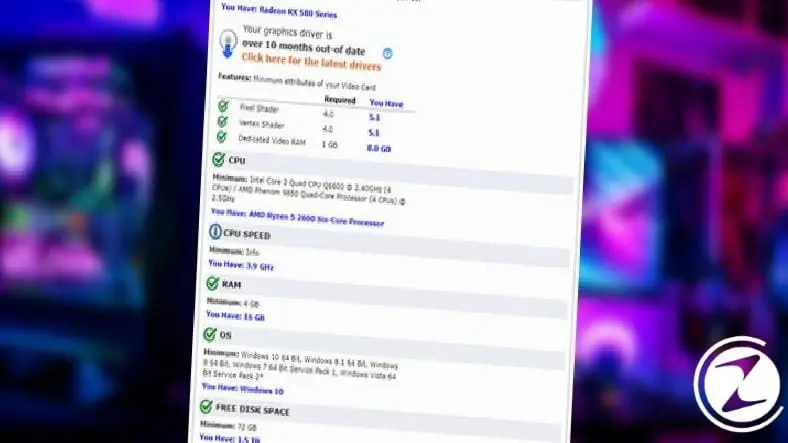
The website where you can best answer the question of which games can run on a computer is System Requirements Lab. This site scans your computer's hardware and scans the data in its database. compares it to the system requirements of games and accordingly, it shows you in detail whether your computer can uninstall the game or not.
To find out which games your computer can run, you need to download Can You Run It's scanning tool to your computer. This tool scans your computer's hardware and sends this data to the site's database. Afterwards, the game you searched for is in the site's database. registered system requirements By comparing with , you get a result.
How to use UserBenchmark?
- Step #1: From here UserBenchmark tool download.
- Step #2: App run.
- Step #3: Run Click the button.
- Step #4: Your computer's specifications will appear on the site.
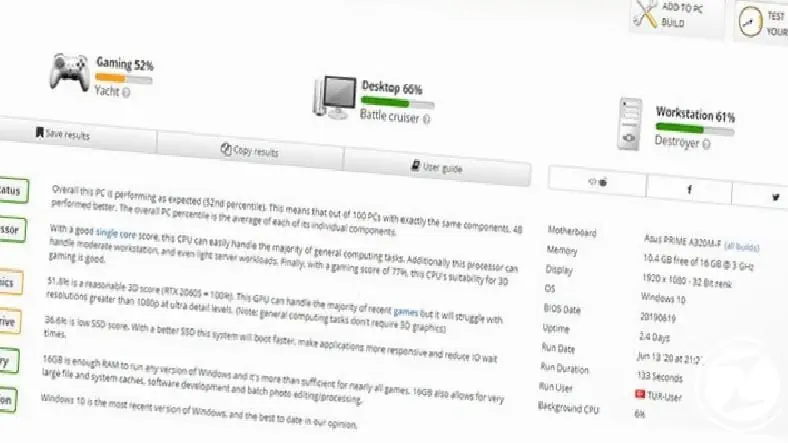
UserBenchmark serves a slightly different purpose than the Can You Run IT site we mentioned above. Similar to the method above, you download and install a diagnostic tool and your computer's hardware is sent to the UserBenchmark database. Here, your systems are compared with other users browsing the site and the performance evaluation of your computer in terms of gaming, work and daily use is presented to you.
How to find an answer to the question "Which games can my computer run without using a program?"
If you say 'No, I do not want any site to access my data', then the question "Which games can the computer remove?" by manual methods You need to solve it. For this, you need to know well what your hardware is. If you wish, you can take a look at our content titled 'Where to Check Graphics Card Features?', which we have prepared on how to take a look at your graphics card features and other hardware information.
Another Webtekno guide We have come to the end. Please do not forget to follow our site to be informed about this and many other useful contents and guides covering games, science and general technology problems and to express your thoughts / suggestions in the comments section below :)
Every business is unique. Let’s explore how we can tailor these ideas to your own digital project.


