
What should be the ideal processor and graphics card temperature?
Like every electronic device, computers are devices that require attention to the temperature of the parts inside. Improper cooling or…

Like every electronic device, computers are devices that require attention to the temperature of the parts inside. Improper cooling or…
Like every electronic device, computers are devices that require attention to the temperature of the parts inside. For many reasons, such as improper cooling or coolers operating with insufficient power, the parts in your computer may be exposed to much higher temperatures than they can handle. Heating related to computers corruption or performance degradation It is most commonly seen in graphics cards and processors.
We will start our article by briefly answering the question of what happens if these components get too hot. Then the processor and graphics card temperatures While answering the questions of what is ideal, we will also explain how you can control the temperature of these parts and what you should do if you encounter temperatures at undesirable levels. Let's get started.
- Notes: If you encounter high temperatures, regardless of the heated part, the first thing you should do is to clean the inside of the computer and the fans. that it is not dusty make sure. We found it more appropriate to give it all at once, rather than writing for each piece one by one.
What happens if the processor or graphics card overheats?
In summary, if the processor or graphics card in your computer operates above ideal temperatures for a long time, permanent damage will occur. If the temperature is too short to cause permanent damage, you will experience sudden performance drops. So, while you are playing games or doing other work, your computer suddenly If it slows down, we recommend you check the temperature values.
Ideal processor temperature why?
The ideal temperatures of components in the computer are examined under two headings. These topics are called "when the processor is idle" and "when under load". At the same time, ideal temperature values are determined not as a single value, but as a range. Accordingly ideal processor temperature while idle 35-50 degrees, when under load 60-85 degree is in the range.
Reaching the lower limit of ideal temperature ranges requires using high-quality coolers unless you live in a very cold place. Therefore, if you do not see 35 degrees when the processor is idle and 60 degrees when under load, you do not need to worry. When you need to worry about the processor idle 50, 85 under load When you see that it has gone above the level.
processor temperature How to check?
while the computer is running processor temperature BIOS can be used to check. Only this way we can understand how many degrees the processor is only when it is idle. Although in some special cases we may need to know the temperature of the processor when it is idle, the processor fan must not be running at all in order for it to reach temperatures that will put the processor at risk while idle.
There are programs that can be used to find out what the processor temperature is under load. One of the most practical and widely used among these programs is “Core Temp". Through Core Temp, you can see the temperature of each core in your processor separately. You can also find out what temperature the processor reaches, when it will automatically shut down or spend less power to warm up, that is, when it will lose performance.
How to cool an overheated processor?

If your processor is above the ideal processor temperatures given above, the first thing you need to do is to check whether your computer is having difficulty drawing air into it due to where it is standing. located on the top of the chassis to make sure you position the computer correctly. a surface that blocks the fans You can check whether . On laptops, you should keep the fan holes open.
Another method you should try to remedy a processor running at high temperatures is to apply thermal paste to the processor. Thermal paste is used to eliminate the air gap between the processor and cooler. Thus, the air drawn by the cooler, without any loss is transferred directly to the processor. For this reason, in order for the processors to operate at ideal temperatures, the correct thermal paste must be applied.

If the processor component reaches higher temperatures than it should, even though it has a constantly working cooler that is properly connected to the motherboard, this is most likely caused by your processor cooler. is that it is faulty. Although Intel and AMD brands sell most of their processor models with stock fans, the material quality of the stock fans and the performance of the fans have difficulty reaching ideal levels.
If you are cooling your processor, which does not operate at ideal temperatures, with the stock fan and there is no overheating due to damage to your processor, your problem will be solved if you purchase a third-party cooler. A third party cooler although you get If there is no positive change in your processor temperatures, you can exercise your right to return the cooler you purchased and get rid of the problem by sending your processor to service. To avoid any unexpected problems during the return process before shopping It would be useful to get information about the return conditions from the seller.
What is the ideal graphics card temperature?

Just like the processor, graphics cards have two different ideal temperature ranges: "idle" and "under load". These ranges are graphics card 30-40 degrees at idle, graphics card 60-85 degrees under load is determined as . Recently, graphics cards that are considered harmless if they exceed 85 degrees have been introduced to the market. If you are using one of the new graphics cards, you should check the capacity of your own model.
How to check graphics card temperature?
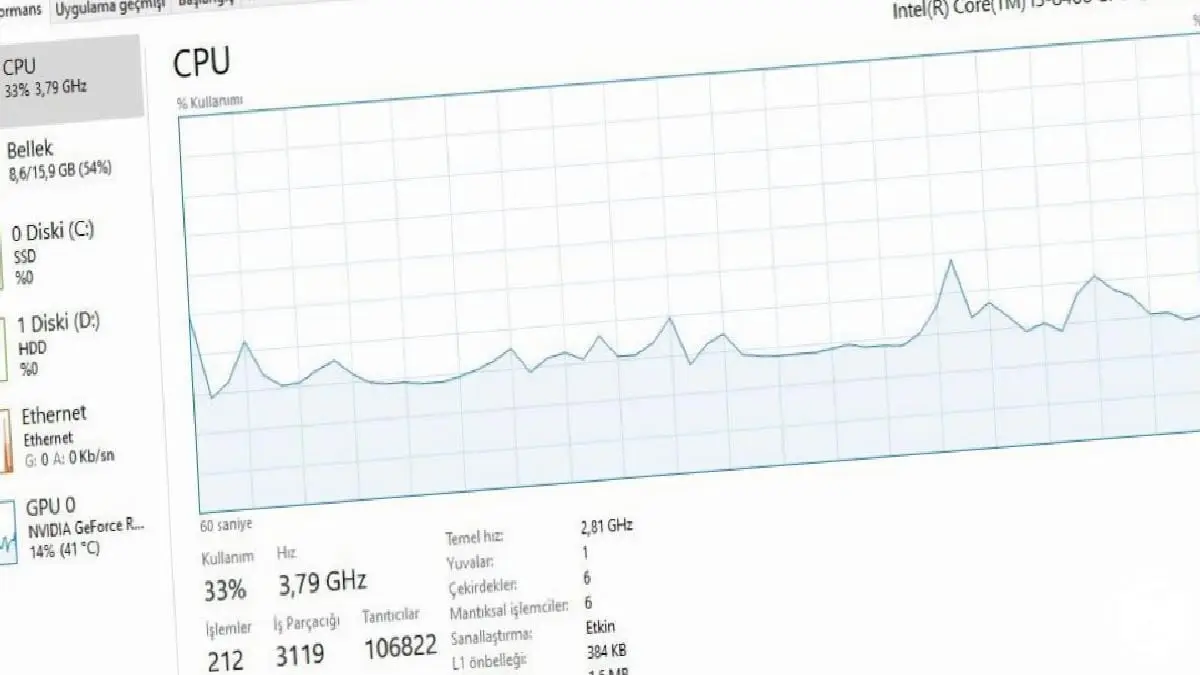
Controlling the graphics card temperature is very easy for Windows 10 users. All you have to do is open Task Manager and click "Performance" tab. When you find the "GPU" item in the computer components listed on the left of this page, you will also see the temperature value of your graphics card. If you are not using Windows 10, it is possible to control the temperature using the software of your video card brand.
How to cool an overheated graphics card?

When your graphics card overheats, the number of methods you can try is less than when the processor overheats. Because operations such as installing an external cooler on the graphics cards or renewing the thermal paste of the graphics card may damage the product. out of warranty However, it is not recommended to be done by people who are not experts in the job.
If your graphics card is overheating, first check whether your computer's fans are blocked. If the fans are blocked, the graphics card fans will not be able to send enough air to the graphics card, as there will not be enough airflow inside the computer. If your computer is sitting empty around it, your graphics card fans may be damaged. possibility of malfunction you should take into consideration.
In order to consume low power, graphics cards are manufactured so that their fans only work after reaching a certain temperature. For this reason, do not worry if the graphics card fans do not work as soon as you turn on the computer. Do something that will put a load on your graphics card, such as playing games for a while. video card Even though the temperature increases. If the fans do not start spinning, this may indicate a malfunction.
Ideal processor and graphics card temperature:
- Ideal temperature range when the processor is idle: 35-50 degrees
- Ideal temperature range when the processor is under load: 60-85 degrees
- Ideal temperature range when the graphics card is idle: 30-40 degrees
- Ideal temperature range when the graphics card is under load: 60-85 degrees
We wanted to add temperatures as a summary at the end of the article as a reminder. In case you jumped here without reading the entire article, we would like to remind you again of an important information about the graphics card temperature. Some graphics cards are over 85 degrees can work smoothly It is designed this way. If your graphics card exceeds 85 degrees, first check the ideal operating temperature of your own graphics card.
In this way, we share the ideal temperatures of the processor and graphics cards, and if you have hardware that operates at higher temperatures than desired, you can use it to reduce its temperature. what you can do We are coming to the end of our article. We hope this was a useful article for you. Webtekno wishes you all a happy day!
Every business is unique. Let’s explore how we can tailor these ideas to your own digital project.


