
How many MB is 1 GB?
The first computer in its modern sense was built in World War II. The 30-ton machine named "ENIAC", which was invented to calculate the artillery fire of the army during World War II...

The first computer in its modern sense was built in World War II. The 30-ton machine named "ENIAC", which was invented to calculate the artillery fire of the army during World War II...
The first computer in today's sense was built in World War II. It was a giant calculator with a weight of 30 tons named "ENIAC", which was invented to calculate the army's artillery fire during World War II. IBM, which had a share in the construction of this computer in 1946, acquired the computer in 1956. Bit And Byte He first introduced the concept. Today we are different too file sizes To express this, we mostly use concepts such as MB (Megabyte), GB (Gigabyte), TB (Terabyte), which are multiples of these.
This process, which started with bits and bytes, has led to a significant increase in the storage capacities of our personal devices along with rapidly developing technology. Even though we do not carry huge computers today, almost all of us have plenty of data on the devices we use. Therefore, those who are curious about the data, “How many MB is 1 GB?They are curious about the answers to questions like "Let's explain the basic logic of this question and data sizes in the digital world.
How many MB is 1 GB?

One kilobyte equals 1024 bytes. So it is 2¹⁰ bytes. For the next byte term, you need to add 10 to the number above it. So one megabyte is 2²⁰ bytes. This equals 1024 kilobytes. With this transaction system We can see that 1 GB equals 1024 MB. You may be a little confused by this process, because we are not used to thinking this way. So let's expand on the subject a little more.
In our daily lives, we use factors of 10 in any unit of measurement. For example, 1 kilogram equals 1000 grams, 1 meter equals 100 centimeters... As for the computer world, it uses 2 to the 10th power as a multiplier, file sizes It is presented to us in this data language. Because this is a system that is easier to calculate by computers. Although it may seem easy to calculate when we are talking about small numbers, there are cases when we are talking about very large units of measurement. There may be numbers with many digits.
What is lice? What is a byte?
Bit The concept was introduced by IBM in 1956. It is the smallest building block and basic unit of value in the processing system of computers. This value is a binary value in computer language. This means: either 0 or 1. Let's give an example to make it easier for you to understand: Think of a door; It is 0 if the door is closed, and 1 if the door is open. For a computer, it doesn't matter how wide the door is open. This system is the easiest and most reliable way to confirm the accuracy of the data. Because this is data with two options. This data; present or absent, open or closed, true or false It is interpreted as .
Byte It refers to the smallest addressable memory unit consisting of 8 bits. Let's think about your kitchen cabinets. Assuming that our knowledge is a glass, the computer system records which cupboard it is on which shelf. Then, when we need that information - in this case the glass - it finds it according to that address and brings it to us.
Why do the values increase as 128, 256, 512?

We said that a byte consists of 8 bits. Since computer systems read data by factors of 2, this value is read as 2³. Since they use the power of 2 as a reference in their measurements, the number values presented to us by computers are the equivalent of these. It makes it easier for us to use these values in daily life. That is, 2⁷ represents 128, 2⁸ represents 256, and 2⁹ represents 512.
When this value is 2¹⁰, its equivalent is 1024. After this value, the purpose of creating abbreviations such as KB, MB, GB, which we frequently use in daily life, is for convenience. If the number above 2 exceeds 10, the digits at the end of the number are deleted and the name of the abbreviation is added instead.
Bytes units of measurement
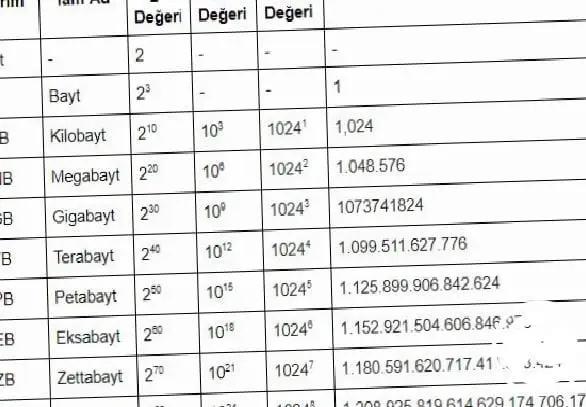
- Kilobyte: KB
- Megabyte: MB
- Gigabyte: GB
- Terabyte: TB
- Petabyte: PB
- Exabytes: EB
- Zettabyte: ZB
- Yottabyte: YB
Why do hard disks have less space than the value written on them?
We have all experienced this situation. For example 16 GB A USB stick with memory shows 14.9GB of free space when purchased new. We are at the computer file sizes We are left with many questions in our minds about. In another example, for example, we can see that a 1 TB external disk has 930 GB of free space. Rest assured, your product is not defective. The reason for the difference here is the manufacturing companies.
Manufacturers also use multiples of 10 as references, just like meters or weight units. We said that 1 GB is 1024 MB. Companies accept this value as 1000 MB and make their production accordingly. As the capacity of the product you purchase increases, your space loss due to this calculation increases proportionally.
In order to prevent this situation, the "Institute of Electrical and Electronics Engineers", aka "IEEE" in the USA, introduced a new measurement standard. However, this system has not achieved widespread use.
In our table below, you can see the standard determined by the IEEE organization and the field difference between the decimal system and the binary system:

Bit And byte to the concepts, “How many MB is 1GB?We tried to clarify questions such as " and the details of the space differences in the external hard drives you purchased, we hope it was helpful.
Every business is unique. Let’s explore how we can tailor these ideas to your own digital project.


